接口返回敏感信息或隐私数据时,必须进行脱敏处理,通常采用 * 替代部分关键信息,以保护用户隐私安全。
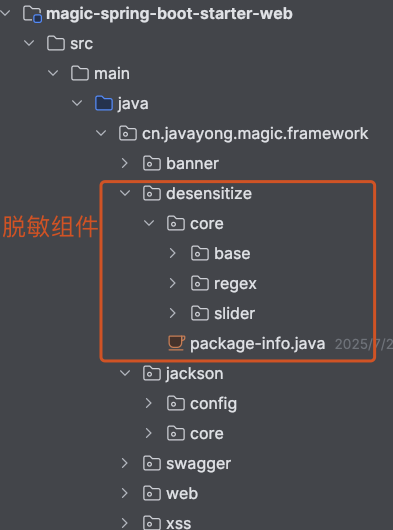
magic-spring-boot-starter-web 模块下的 desensitize 包负责实现脱敏功能,它采用注解 + jackson 序列化期间脱敏 支持不同模块不同的脱敏条件,同时支持多种策略比如身份证、手机号、地址、邮箱、银行卡等 可自行扩展。
# 1 示例展示
如下图,用户列表页面会展示手机号 ,展示的是明文 。

假如想显示脱敏信息,则需要在 UserSaveReqVO 类 mobile 属性上添加注解 。
@Schema(description = "管理后台 - 用户信息 Response VO")
@Data
@ExcelIgnoreUnannotated
public class UserRespVO{

    // 省略代码

    @Schema(description = "手机号码", example = "15601691300")
    @ExcelProperty("手机号码")
    @MobileDesensitize  // 手机号的脱敏注解
    private String mobile;

}
2
3
4
5
6
7
8
9
10
11
12
13
14
显示效果见下图:

# 2 脱敏分类
脱敏分为两种类型:正则脱敏和滑块脱敏 。
- 正则脱敏
注解 @RegexDesensitize:根据正则表达式,将原始数据进行替换处理。
public @interface RegexDesensitize {

    /**
     * 匹配的正则表达式(默认匹配所有)
     */
    String regex() default "^[\\s\\S]*$";

    /**
     * 替换规则,会将匹配到的字符串全部替换成 replacer
     */
    String replacer() default "******";

}
2
3
4
5
6
7
8
9
10
11
12
13
同样是手机号 ,我在 mobile 属性上添加 正则脱敏:
@Schema(description = "手机号码", example = "15601691300")
@ExcelProperty("手机号码")
@RegexDesensitize(regex = "^1[3-9]\\d{9}$", replacer = "****")
private String mobile;
2
3
4
通过正则表达式,可以将手机号转换为脱敏记录 **** 。

- 滑块脱敏
注解 @SliderDesensitize:根据设置的左右明文字符长度,中间部分全部替换为 *
public @interface SliderDesensitize {

    /**
     * 后缀保留长度
     */
    int suffixKeep() default 0;

    /**
     * 替换规则,会将前缀后缀保留后,全部替换成 replacer
     *
     * 例如:prefixKeep = 1; suffixKeep = 2; replacer = "*";
     * 原始字符串  123456
     * 脱敏后     1***56
     */
    String replacer() default "*";

    /**
     * 前缀保留长度
     */
    int prefixKeep() default 0;

    /**
     * 是否禁用脱敏
     *
     * 支持 Spring EL 表达式,如果返回 true 则跳过脱敏
     */
    String disable() default "";
}
2
3
4
5
6
7
8
9
10
11
12
13
14
15
16
17
18
19
20
21
22
23
24
25
26
27
28
还是举手机号的例子, 在手机号上添加注解:
@Schema(description = "手机号码", example = "15601691300")
@ExcelProperty("手机号码")
@SliderDesensitize(prefixKeep = 3 , suffixKeep = 4 , replacer = "*")
private String mobile;
2
3
4
原始字符串 15011319235,脱敏后字符串 150****9235 。
所有注解如下:
| 脱敏规则注解 | 原始数据示例 | 脱敏后结果 |
|---|---|---|
@MobileDesensitize | 13812345678 | 138****5678 |
@FixedPhoneDesensitize | 075582563322 | 0755******22 |
@BankCardDesensitize | 6225880212345678 | 622588******5678 |
@PasswordDesensitize | Abcd123! | ******** |
@CarLicenseDesensitize | 京B12345 | 京B1***5 |
@ChineseNameDesensitize | 王小明 | 王** |
@IdCardDesensitize | 110105199003072839 | 110105**********39 |
# 3 字段权限
通过数据脱敏,可以实现一定程度的字段权限,通过每个脱敏注解上的 disable 属性。
// @MobileDesensitize.java

/**
 * 是否禁用脱敏
 *
 * 支持 Spring EL 表达式,如果返回 true 则跳过脱敏
 */
String disable() default "";
2
3
4
5
6
7
8
1、角色判断
例如说:只有超管可以查看完整手机号,其它用户只能查看脱敏后的手机号。
// XXXVO.java

@EmailDesensitize(disable = "@ss.hasRole('super_admin')")
private String mobile;
2
3
4
2、权限判断
只有拥有 user:info:query-mobile 权限的用户,才能查看完整手机号。
// XXXVO.java

@EmailDesensitize(disable = "!@ss.hasPermission('user:info:query-mobile')")
2
3
# 4 源码解析
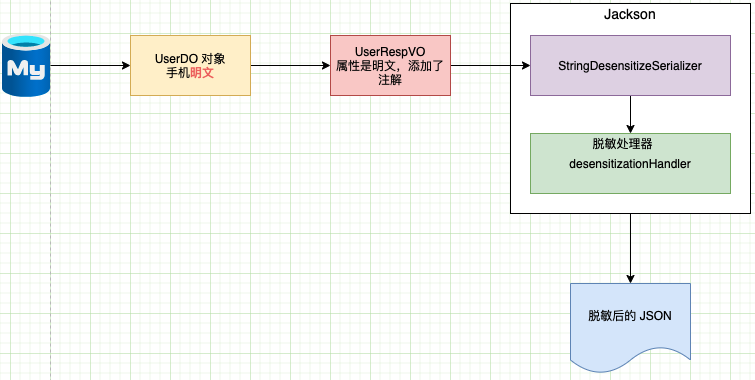
如图,从数据库取出用户的手机号是明文,然后通过 service 将 DO 对象转换成 VO 对象,最后通过 jackson 将对象转换成 JSON 。
我们重点关注了 StringDesensitizeSerializer ,该类是脱敏序列化类。

即:判断 VO 对象中属性是否有过敏注解 ,若有则调用 该注解的脱敏处理器生成脱敏字符串。
进入滑块脱敏处理器 , 代码逻辑很简单:
   public String desensitize(String origin, T annotation) {
        // 1. 判断是否禁用脱敏
        Object disable = SpringExpressionUtils.parseExpression(getDisable(annotation));
        if (Boolean.TRUE.equals(disable)) {
            return origin;
        }

        // 2. 执行脱敏
        int prefixKeep = getPrefixKeep(annotation);
        int suffixKeep = getSuffixKeep(annotation);
        String replacer = getReplacer(annotation);
        int length = origin.length();
        int interval = length - prefixKeep - suffixKeep;

        // 情况一:原始字符串长度小于等于前后缀保留字符串长度,则原始字符串全部替换
        if (interval <= 0) {
            return buildReplacerByLength(replacer, length);
        }

        // 情况二:原始字符串长度大于前后缀保留字符串长度,则替换中间字符串
        return origin.substring(0, prefixKeep) +
                buildReplacerByLength(replacer, interval) +
                origin.substring(prefixKeep + interval);
    }
2
3
4
5
6
7
8
9
10
11
12
13
14
15
16
17
18
19
20
21
22
23
24
这里首先通过 SpringExpressionUtils 类判断注解是否添加了 disable 注解 ,若没有禁用脱敏 ,则执行脱敏操作。